Graphics · Asset pipelines
Splatbox
2026A browser workspace for 3D assets, animation and Gaussian splats
- React
- TypeScript
- Three.js
- Fastify
- BullMQ
- Blender
- S3
Saved demo · No sign-in needed
Silent repository recording: source video and character motion play side by side on one clock, with matching frame readouts. Sample: Cesium Man, © 2017 Cesium (CC BY 4.0), rendered for Splatbox. This saved capture does not depend on the hosted service.
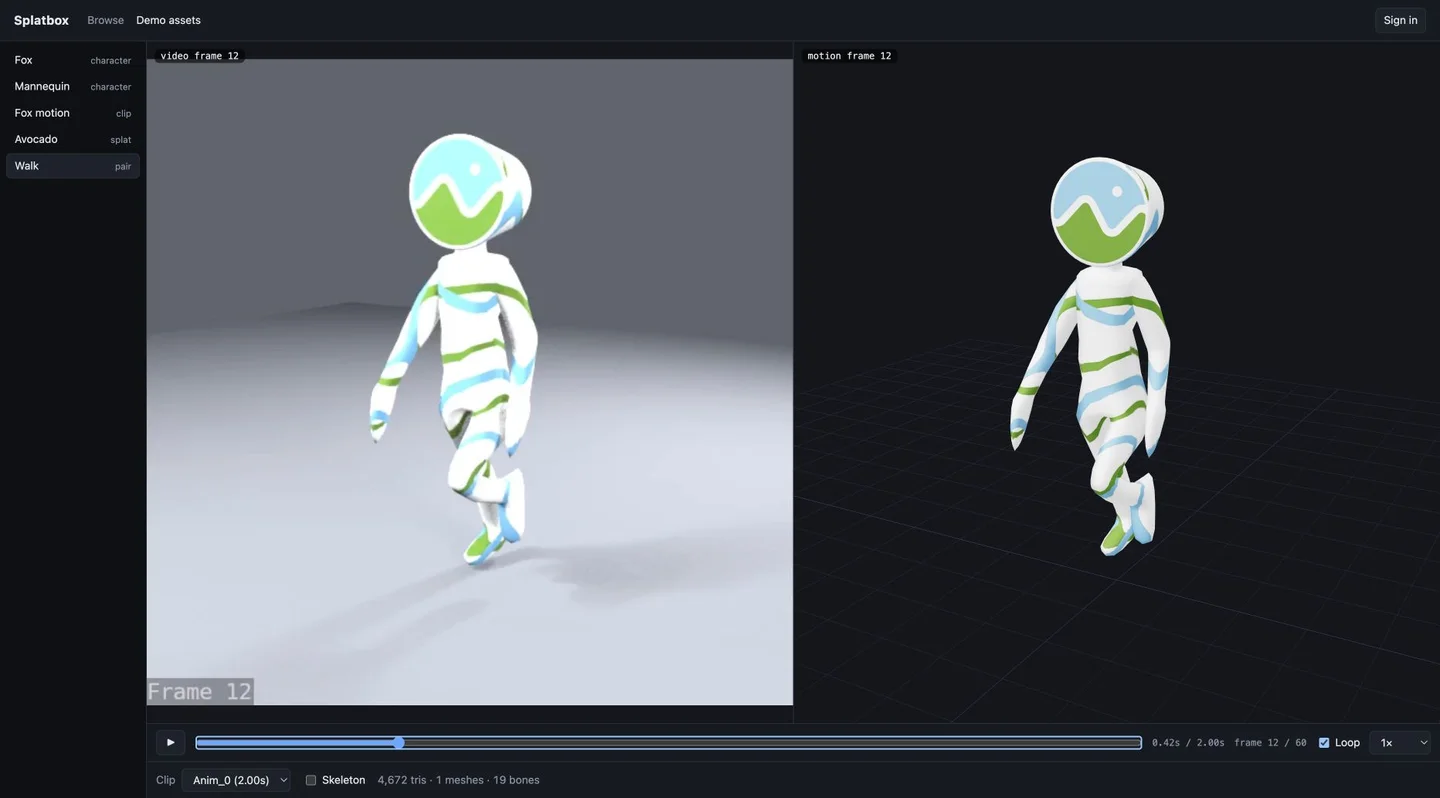
3D files need more than a download link. A character needs animation controls, a splat needs its own renderer, and generated motion needs to be checked against its source video. I built Splatbox to bring those inspection workflows together and handle the conversion work in the background.
What I built
A React and Three.js workspace with clip selection, timeline scrubbing, skeleton overlays and Gaussian splat controls. A Fastify API signs direct uploads to S3-compatible storage, then BullMQ workers convert models with headless Blender and generate turntable thumbnails. The browse grid exposes processing status and conversion details alongside the assets.
Technical decisions
- One canvas, explicit cleanup. The viewer keeps one WebGL context and swaps assets inside it. Disposal is part of the lifecycle; the repository’s browser tests check memory while repeatedly switching assets.
- One playback clock. Video and motion share transport state. During playback the video supplies the timebase; scrubbing sets both views to the selected time.
- Conversion before rendering. A BullMQ dependency makes the turntable wait for the converted GLB. Blender handles model rendering; headless Chromium uses the viewer’s own renderer for splats.
- Inspect the output. The conversion pipeline records geometry and texture counts. If a GLB conversion grows the file, the worker keeps the original. Texture conversion also preserves the original when re-encoding is not useful.
Quick walkthrough
- Open the viewer demo and choose a bundled character. Select a clip, scrub the timeline and toggle its skeleton.
- Switch to a Gaussian splat and inspect it with orbit and display controls.
- Open the video-and-motion pair. Play or scrub once to move both panes together.
The saved recording above shows synchronized playback, and the screenshot link opens a saved view of both panes at the same frame. Both remain available when the hosted service is offline. The conversion report records the benchmark’s asset set and settings; compression varies substantially with the source content.
Scope and limits
SQLite keeps the API and worker simple on one host, but sharing that database file constrains deployment across machines. The demo uses a shared owner token for writes rather than per-user permissions. Clip transfer requires matching bones; this is an inspection and conversion tool, not a general retargeting system.